


Jump to content
  • 0

Amazon EC2 Instance ARMA II


500gb

Question

Hello,


I'm setting up an Epoch server on VPS. I used Steam to install ARMA II and OA on an Amazon EC2 Instance and it doesn't seem to have the graphics power to run ARMA II Manually for the first time (In order to unpack files??) I can't proceed with the install unless ARMA II is run once.


I just want to use this as a server,


is there any way to continue without this step?


Is there something I can add to the .exe to force it to run in super low settings the instance could handle?


:unsure: wat do?
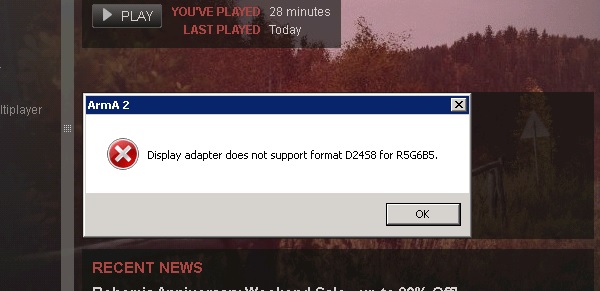
post-16583-0-74154000-1402089170_thumb.j

Link to comment
Share on other sites

9 answers to this question

Recommended Posts

  • 0

Hello,


I'm setting up an Epoch server on VPS. I used Steam to install ARMA II and OA on an Amazon EC2 Instance and it doesn't seem to have the graphics power to run ARMA II Manually for the first time (In order to unpack files??) I can't proceed with the install unless ARMA II is run once.


I just want to use this as a server,


is there any way to continue without this step?


Is there something I can add to the .exe to force it to run in super low settings the instance could handle?


:unsure: wat do?

 

If you have Arma/OA installed on your personal computer, just copy all the files across?

Link to comment
Share on other sites

  • 0

I did and I do and even though it installs directX it gives that error about the display adapter, and day Z commander / Day Z Control Center say the game has not been installed or hasn't been run yet. They do have to be run once right?

Link to comment
Share on other sites

  • 0

When I was setting up my Epoch server on a VPS I tried to run A2 and OA for the first time and got errors about something related to the video.  If I remember correctly, running those for the first time just sets up the registry with your CD-Keys, file paths, etc. which aren't used (I don't believe) when you run the arma2oaserver.exe file to start your server.  DayZ Commander isn't needed in order to set up your server.  Just download the Epoch client / server files from http://dayzepoch.com/ and follow one of the guides on here to set everything up.


Also, in order to upgrade your server's Arma2 OA beta patch just copy the Expansion/beta folder to your server.  Although to be thorough you could check all the files inside of the Expansion folder just to be sure every updated file gets copied (I think 112555 (which I don't recommend installing yet) changes more than just the beta folder :angry:).

Link to comment
Share on other sites

Please sign in to comment

You will be able to leave a comment after signing in


Sign In Now
  • Advertisement
  • Discord

×
×
  • Create New...